
Blog
How to Protect Your Smartphone Battery While Fast Charging

Fast charging has transformed the way we use smartphones. Instead of waiting hours for a battery to reach 100%, modern phones can gain a significant amount of power in just a few minutes. It is incredibly convenient when you are heading out, working, traveling, or simply forgot to charge your phone overnight.
However, frequent fast charging raises an important question:
How to Protect Your Smartphone Battery While Fast Charging
The good news is that fast charging itself does not automatically damage your battery. Modern smartphones use charging controls, temperature monitoring, and power management systems to keep charging safe. Still, excessive heat, poor-quality accessories, and certain charging habits can accelerate battery aging.
Here are practical ways to enjoy fast charging while helping your smartphone battery stay healthier for longer.
1. Use a Genuine or Certified Charger
One of the easiest ways to protect your battery is to use a reliable charger designed for your smartphone.
Cheap, counterfeit, or poorly manufactured chargers may not provide stable power or adequate protection. A quality charger communicates properly with your phone and can regulate voltage and current according to the device’s requirements.
When buying a charger, look for:
- A reputable manufacturer
- Appropriate charging standards
- Proper voltage and current ratings
- Built-in safety protections
- Compatibility with your smartphone
A powerful charger is not necessarily better if your phone does not support its charging technology.
2. Choose a High-Quality Charging Cable
The charger is only one part of the charging system. Your cable also plays an important role.
A damaged, extremely thin, or low-quality cable can cause inefficient charging and may generate additional heat. For USB-C devices, choose a cable that supports the required power and charging standard.
Inspect your cable regularly for:
- Frayed insulation
- Bent connectors
- Loose connections
- Exposed wires
- Excessive heating
Replacing a worn cable is a small investment compared with replacing a smartphone battery.
3. Keep Your Phone Cool While Charging
Heat is one of the biggest enemies of battery longevity.
Fast charging naturally produces some heat, but excessive temperatures can contribute to faster battery degradation. This is why you should avoid charging your phone in hot environments.
Try not to fast-charge your smartphone:
- Under direct sunlight
- Inside a hot car
- Under a pillow or blanket
- Near a heater
- In an enclosed space with poor ventilation
Place your phone on a hard, uncovered surface while charging so heat can escape more easily.
4. Remove the Phone Case If It Gets Too Hot
Some thick protective cases can trap heat during intensive charging.
You do not necessarily need to remove your case every time you charge your phone. However, if you notice that your device becomes unusually warm while fast charging, temporarily removing the case can improve heat dissipation.
A useful rule is simple: if your phone feels excessively hot, give it more airflow.
5. Avoid Heavy Phone Usage During Fast Charging
Watching high-resolution videos, playing demanding games, using GPS navigation, or running intensive applications while fast charging can increase the phone’s overall temperature.
The combination of:
Fast charging + processor workload + heat
can place additional thermal stress on the battery.
If you need to charge quickly, consider putting your phone aside for a few minutes. You will usually get faster and cooler charging when the device is not working hard at the same time.
6. Don’t Make 100% Charging a Daily Requirement
Lithium-ion batteries don’t necessarily need to reach 100% every time you charge them.
For everyday use, keeping the battery within a moderate range can help reduce long-term battery stress. Many modern smartphones also include features such as optimized charging, adaptive charging, or battery protection modes that can reduce the amount of time the battery spends at maximum charge.
If your phone offers a battery protection feature, consider enabling it.
This is especially useful if you regularly charge your phone overnight or keep it connected to power for extended periods.
7. Use Optimized or Adaptive Charging
Many newer smartphones can learn your charging habits.
For example, instead of immediately charging the battery to full capacity, an optimized charging system may slow or pause charging near the upper range and finish closer to the time you normally unplug your phone.
Check your smartphone’s Battery or Charging settings for options such as:
- Optimized Charging
- Adaptive Charging
- Battery Protection
- Charging Limit
- Protect Battery
The exact name and features vary between manufacturers and models.
8. Don’t Wait Until the Battery Is Completely Empty
Another common misconception is that you should regularly drain your smartphone to 0% before charging it.
Modern lithium-ion batteries generally do not require this type of routine. In fact, repeatedly allowing your phone to reach extremely low charge levels can be less convenient and may contribute to unnecessary battery stress.
Instead, recharge your phone whenever it is practical.
A partial charge can be perfectly normal for everyday smartphone use.
9. Don’t Fast Charge in Extremely Hot or Cold Conditions
Temperature matters in both directions.
Very high temperatures can accelerate battery aging, while extremely cold conditions can temporarily affect battery performance and charging behavior.
If your phone is unusually hot or cold, allow it to return to a more normal operating temperature before demanding a fast charge.
Your smartphone may also automatically slow or stop charging when its temperature reaches an unsafe level. Do not try to bypass these protections.
10. Keep Your Phone and Charging Port Clean
Dust, lint, and debris inside the charging port can interfere with the connection between your phone and cable.
A poor connection can result in:
- Intermittent charging
- Slower charging
- Excessive connector heating
- Charging interruptions
Keep the charging port clean and handle it carefully. Avoid forcing the cable into the port or using sharp metal objects that could damage the internal contacts.
11. Don’t Use Damaged Charging Accessories
A charger or cable showing signs of physical damage should not be treated as “good enough.”
Replace accessories if you notice:
- Cracked charger housing
- Burn marks
- Melted plastic
- Exposed wiring
- Bent connectors
- Unusual buzzing
- Excessive heat
- A loose charging connection
Charging accessories are designed to deliver electrical power. Using damaged equipment is not worth the risk.
12. Understand That Fast Charging Doesn’t Always Mean Maximum Power
Your phone and charger work together to determine the actual charging speed.
For example, connecting a high-wattage charger to a phone that supports a lower charging limit does not mean the phone will automatically receive the charger’s maximum rated power.
The phone’s charging system typically controls how much power it accepts based on factors such as:
- Battery temperature
- Battery charge level
- Charger compatibility
- Cable capabilities
- Device workload
- Charging technology
So, buying the highest-wattage charger available is not always necessary.
13. Avoid Unnecessary Wireless Charging Heat
Wireless charging is convenient, but some wireless charging setups can generate more heat than wired charging.
If you use wireless fast charging, make sure your phone and charging pad are compatible and properly aligned. Avoid placing objects between the phone and charging pad.
If the phone becomes significantly warmer than usual, consider using a wired charger when you need faster and more efficient charging.
14. Keep Your Smartphone Software Updated
Charging management is partly controlled by your phone’s software and firmware.
Manufacturers may release updates that improve battery management, thermal controls, charging behavior, and overall system efficiency.
Keeping your smartphone updated can therefore be useful for more than just getting new features.
However, only install official system updates from trusted sources.
15. Don’t Panic About Fast Charging
One of the biggest misconceptions about modern smartphones is that fast charging automatically destroys battery health.
That’s not how modern charging systems are designed.
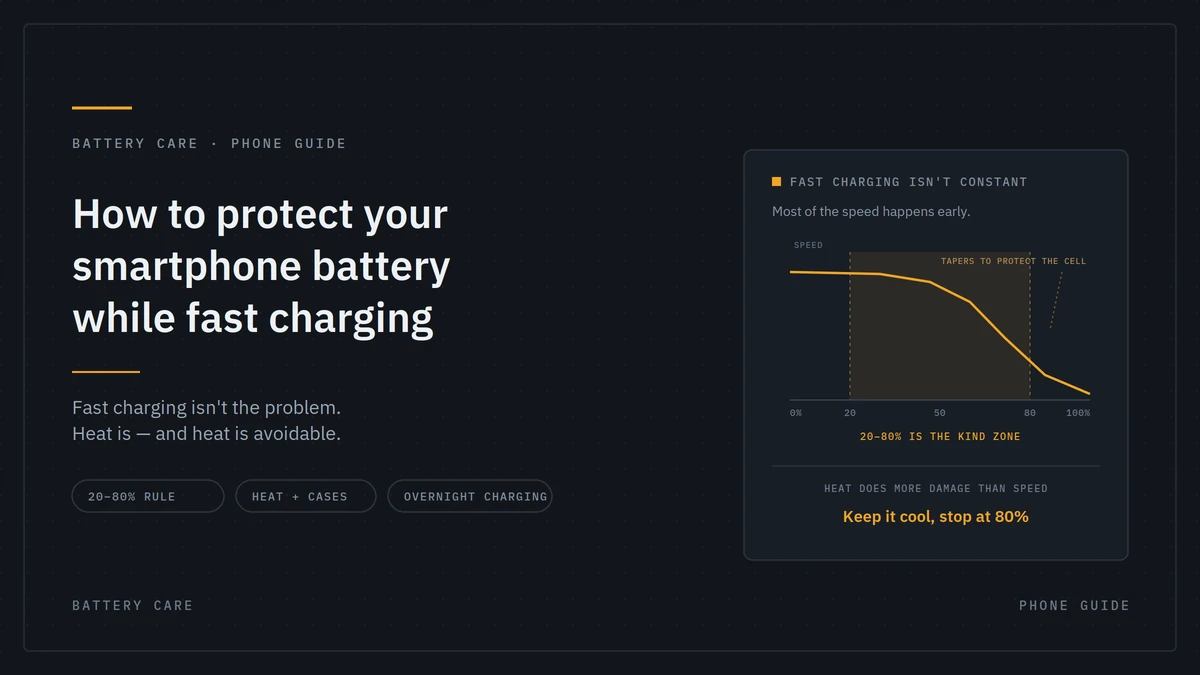
Smartphones use multiple safeguards to manage charging. Charging speed can also decrease as the battery approaches a high charge level. This helps manage heat and battery stress.
The bigger concern is repeated exposure to excessive heat and poor charging practices, rather than simply the fact that the charger is “fast.”
Fast Charging vs. Battery Health: Finding the Balance
Fast charging is extremely useful when you need power quickly. The goal isn’t to avoid it completely—it is to use it intelligently.
Think of your charging habits like this:
| Charging Habit | Effect on Battery Care |
| Using a quality charger | Helps provide stable charging |
| Using a compatible cable | Supports reliable power delivery |
| Keeping the phone cool | Helps reduce thermal stress |
| Using optimized charging | Can reduce time at high charge |
| Avoiding 0% regularly | Reduces unnecessary deep discharge |
| Gaming while fast charging | Can increase heat |
| Charging under a pillow | Traps heat |
| Using damaged accessories | Creates unnecessary safety risks |
| Charging in extreme heat | Can accelerate battery aging |
Small changes can make a meaningful difference over the lifetime of your smartphone.
What Is the Best Charging Routine for Your Phone?
There is no single perfect charging routine for every smartphone. Your ideal approach depends on your device, usage pattern, battery capacity, and charging technology.
For everyday use, a sensible routine is:
Use a compatible charger → keep the phone cool → avoid unnecessary heavy usage while charging → enable battery protection features → replace damaged accessories.
If you need a quick boost before leaving home, fast charging is perfectly practical. You don’t need to avoid it simply because you’re concerned about battery health.
Common Fast-Charging Mistakes to Avoid
Here are some habits worth changing if you want to maximize battery longevity:
Leaving Your Phone in Direct Sunlight
A fast charger combined with a hot environment can push temperatures higher than necessary.
Using Very Cheap Chargers
A low price isn’t a problem by itself, but unknown or counterfeit accessories may lack appropriate safety and power-management features.
Gaming While Charging
Demanding games generate additional heat while the battery is already receiving power.
Covering the Phone
Charging underneath blankets, pillows, or other materials can prevent heat from escaping.
Using Damaged Cables
A worn cable can cause charging instability and should be replaced.
Ignoring Battery Protection Settings
If your phone provides charging limits or optimized charging, take advantage of them.
How to Extend Smartphone Battery Life Long-Term
Protecting your battery isn’t only about charging. Your overall phone usage also matters.
You can improve long-term battery care by:
- Keeping the phone at reasonable temperatures
- Avoiding unnecessary deep discharges
- Using battery-saving features when appropriate
- Reducing excessive background activity
- Keeping software updated
- Using reliable charging accessories
- Avoiding prolonged exposure to extreme temperatures
- Using optimized charging features
Remember that smartphone batteries are consumable components. Even with excellent care, battery capacity gradually decreases over time.
The objective isn’t to keep the battery at 100% health forever—it is to slow unnecessary degradation and get the most useful life from it.
Final Thoughts
Fast charging is one of the most convenient smartphone technologies available today, and you don’t have to give it up to protect your battery.
The key is temperature control, quality accessories, smart charging habits, and built-in battery protection features.
Use a reliable charger and cable, keep your phone well ventilated, avoid demanding activities during charging when possible, and enable optimized charging or battery protection if your smartphone supports it.
With these simple habits, you can enjoy the speed of fast charging while giving your smartphone battery a better chance of staying reliable for years to come.
Frequently Asked Questions
Does fast charging damage a smartphone battery?
Fast charging does not automatically damage your battery. Excessive heat and prolonged exposure to high temperatures are bigger concerns for long-term battery health.
Is it safe to use a high-wattage charger?
Generally, yes, provided the charger is reputable and compatible with your phone. The smartphone’s charging system typically controls how much power the device accepts.
Should I remove my phone case while fast charging?
Not always. If your phone becomes noticeably hot, removing a thick case can help improve heat dissipation.
Is it bad to charge my phone overnight?
Modern smartphones include charging-management systems that reduce the risks associated with prolonged charging. If available, use optimized charging or a charging-limit feature for additional battery care.
Should I let my phone battery reach 0% before charging?
No. Regularly draining a modern lithium-ion smartphone battery completely isn’t necessary. Partial charging is normal and convenient.
Why does my phone charge slower near 100%?
Charging speed often decreases as the battery approaches a high charge level. This helps manage heat and protect the battery.
What is the biggest enemy of smartphone battery health?
Excessive heat is one of the major factors that can accelerate battery aging. Keeping your phone within a reasonable temperature range is an important part of battery care.