Blog
Why Your Phone Charges Slowly: Common Causes & Solutions

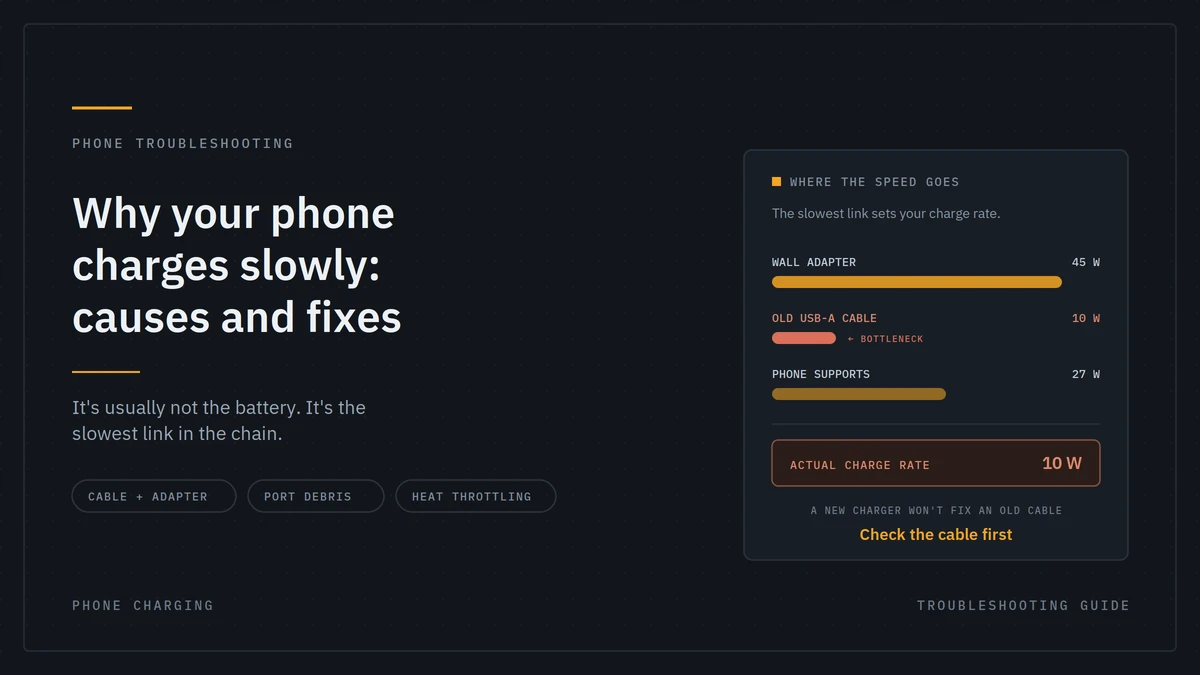
There are few things more frustrating than plugging your phone in expecting a quick battery boost, only to discover that it is charging painfully slowly. You may leave it connected for hours and still find the battery nowhere near full.
But Why Your Phone Charges Slowly?
The answer could be something as simple as a damaged cable, a weak charger, dust inside the charging port, excessive background activity, or even a battery that has reached the end of its useful life.
The good news is that many slow-charging problems are easy to identify and fix.
In this guide, we’ll explore the common causes of slow phone charging and practical solutions that can help your device charge more efficiently.
1. Your Charger May Not Provide Enough Power
One of the most common reasons for slow charging is using a charger that doesn’t deliver enough power for your phone.
Older chargers may provide only limited wattage, while newer smartphones can support significantly faster charging speeds.
For example, if your phone supports fast charging but you’re using a low-power adapter, the device may charge much more slowly than expected.
Solution
Check your phone’s recommended charging specifications and use a compatible charger with sufficient power output.
If your phone supports fast charging, make sure the adapter supports the appropriate charging technology.
2. The Charging Cable Could Be Damaged
Your charging cable plays a bigger role than many people realize.
A cable can become damaged from frequent bending, pulling, twisting, or everyday wear. Even when the cable appears fine externally, internal damage can affect charging performance.
A poor-quality or incompatible cable may also limit charging speed.
Solution
Try charging your phone with another high-quality, compatible cable.
If charging becomes noticeably faster, your original cable is likely the problem.
Avoid extremely cheap cables from unreliable sources, especially if they don’t clearly state their power or charging specifications.
3. Dust and Debris in the Charging Port
Your phone’s charging port is constantly exposed to pockets, bags, tables, and other environments where dust and debris can accumulate.
Even a small amount of compacted lint inside the port can prevent the connector from making proper contact.
This can result in:
- Slow charging
- Intermittent charging
- A loose connection
- Charging that stops and starts
Solution
Inspect the charging port carefully under good lighting.
If you notice visible debris, clean it gently using an appropriate non-metallic method. Avoid forcing objects into the port or using sharp metal tools, as you could damage the contacts.
If the port is damaged or heavily clogged, professional cleaning or repair may be safer.
4. You’re Using Your Phone While It Charges
Streaming videos, gaming, using GPS, recording video, or running demanding applications can consume significant power.
If your phone is using energy almost as quickly as the charger supplies it, the battery percentage may increase very slowly.
This can be particularly noticeable when playing graphics-intensive games while charging.
Solution
For faster charging, reduce your phone usage while it is plugged in.
For the quickest possible charge, lock the screen and leave the phone alone for a while.
5. Your Phone Is Getting Too Hot
Temperature can have a major effect on charging performance.
Smartphones include thermal protection systems designed to prevent battery damage. When the device becomes too hot, charging speed may automatically decrease.
Heat can come from:
- Direct sunlight
- Gaming while charging
- Hot environments
- Thick cases
- Poor ventilation
- High-power charging
Solution
Move the phone to a cooler location and avoid demanding applications while charging.
If your phone becomes unusually hot even during normal charging, investigate the charger, cable, battery, or device for potential problems.
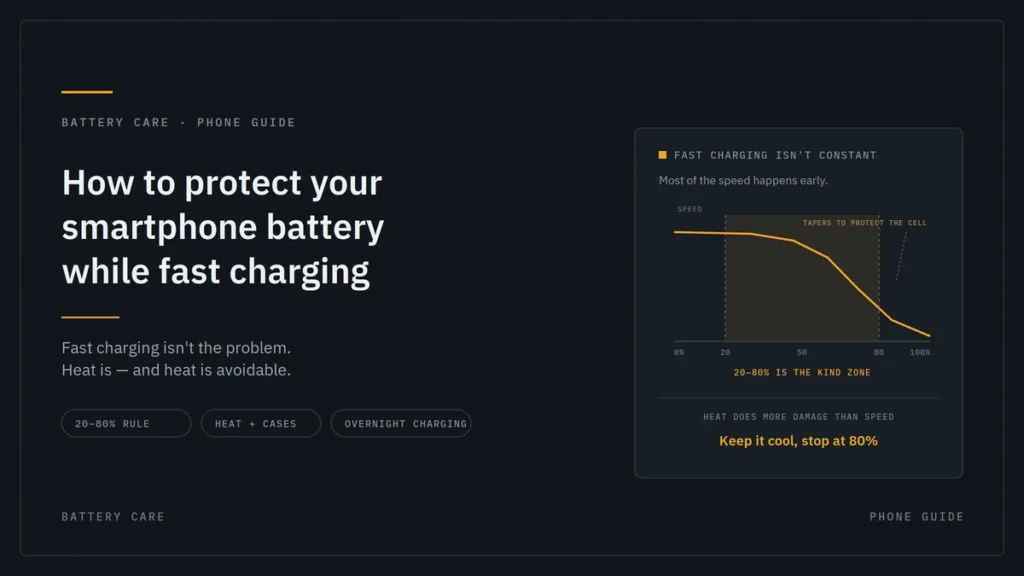
6. Fast Charging May Stop at Higher Battery Levels
Your phone doesn’t necessarily charge at maximum speed from 0% to 100%.
Modern smartphones often use intelligent charging systems that adjust charging speed depending on battery temperature, battery level, and other factors.
Charging may be noticeably faster at lower battery levels and slower as the battery approaches full capacity.
This is normal.
Solution
Don’t assume that slower charging near 80–100% automatically means something is wrong.
Your phone may deliberately reduce charging speed to manage heat and protect battery longevity.
7. Battery Health May Have Declined
Smartphone batteries are consumable components. Over time, repeated charging cycles can reduce their capacity and performance.
An aging battery may:
- Drain faster
- Take longer to charge
- Become warmer
- Shut down unexpectedly
- Hold less charge than it used to
Solution
Check your phone’s battery health information if the manufacturer provides it.
If the battery health has significantly deteriorated or the phone shows signs of battery damage, professional battery replacement may restore normal performance.
8. Background Apps Are Consuming Power
Your phone can continue performing tasks even when you’re not actively using it.
Cloud synchronization, location services, social media apps, downloads, updates, and other background processes can consume battery power while the phone is charging.
Solution
Close unnecessary demanding applications and pause large downloads while charging.
You can also check your phone’s battery settings to identify apps consuming unusually high amounts of power.
9. Your Power Source May Be the Problem
Where you plug your charger in can affect charging speed.
Charging through an old computer USB port, low-power hub, or unsuitable adapter may provide significantly less power than a modern wall charger.
Solution
For faster charging, use a suitable wall adapter that supports your phone’s charging requirements.
If you’re using a power bank, check its output specifications as well.
10. Wireless Charging Can Be Slower
Wireless charging is convenient, but depending on the phone, charger, alignment, temperature, and charging standard, it may be slower than wired charging.
Poor alignment can also reduce charging efficiency.
Solution
Place your phone correctly on the charging pad and use a compatible wireless charger.
If speed is your priority, wired charging may be the better option.
11. The Charger May Not Support Your Phone’s Fast-Charging Standard
Fast charging isn’t simply about buying a charger with a high wattage rating.
Different smartphones and chargers can use different charging technologies and protocols. If they aren’t properly compatible, the phone may fall back to a slower charging mode.
Solution
Choose a charger that is specifically compatible with your phone and its supported fast-charging technology.
Don’t rely solely on the wattage printed on the charger.
12. Your Phone’s Software Could Be Affecting Charging
Occasionally, software issues can interfere with charging behavior.
A system bug, outdated software, or charging-management feature may cause unexpected charging performance.
Solution
Make sure your phone is running the latest available system software.
You can also restart the phone and check whether charging performance improves.
If the problem started immediately after a software update, monitor the device and check for subsequent updates or manufacturer guidance.
13. Optimized Charging May Be Enabled
Many modern smartphones include battery protection features that intentionally control charging speed or delay charging beyond a certain level.
These features are designed to reduce battery aging rather than maximize charging speed at every moment.
Solution
Check your phone’s battery settings for features such as:
- Optimized Charging
- Adaptive Charging
- Battery Protection
- Charge Limit
If you need the phone fully charged quickly, you may be able to temporarily adjust the relevant setting. However, keeping battery protection features enabled is generally beneficial for long-term battery health.
Quick Troubleshooting Checklist
If your phone suddenly starts charging slowly, try these steps:
- Try a different compatible charging cable.
- Try another suitable power adapter.
- Plug directly into a wall outlet.
- Check the charging port for debris.
- Stop demanding apps while charging.
- Remove a thick case if the phone is overheating.
- Restart the phone.
- Check battery health.
- Install available software updates.
- Test wired charging if you’re using wireless charging.
These simple checks can help you identify whether the problem is related to the charger, cable, phone, software, temperature, or battery.
When Should You Replace Your Charger?
Consider replacing your charger if it shows signs of physical damage, becomes unusually hot, produces inconsistent charging, or no longer delivers the expected charging performance.
Avoid using damaged adapters or cables, especially if you notice exposed wires, cracked housing, burning smells, or unusual electrical behavior.
Choosing a reputable charger designed for your device is a much better option than using an unreliable low-cost alternative.
When Is Professional Repair Necessary?
If you’ve tested multiple compatible chargers and cables but your phone still charges slowly, the issue may be inside the device.
Possible causes include:
- Damaged charging port
- Faulty charging circuitry
- Degraded battery
- Internal hardware problems
- Moisture or corrosion
In these situations, professional diagnosis is recommended rather than repeatedly experimenting with different chargers.
How to Keep Your Phone Charging Efficiently
A few simple habits can help maintain good charging performance:
Use Quality Accessories
Use reputable chargers and cables that match your phone’s requirements.
Keep the Charging Port Clean
Prevent dust and lint from accumulating inside the port.
Avoid Excessive Heat
Don’t leave your phone charging under direct sunlight or in extremely hot environments.
Don’t Constantly Stress the Battery
Heavy gaming or intensive applications while charging can generate additional heat.
Replace Aging Batteries When Necessary
If battery health has significantly declined, replacing the battery may be more effective than replacing the charger.
FAQs
1. Why is my phone charging slowly even with the original charger?
Slow charging can be caused by a damaged cable, dirty charging port, excessive heat, battery degradation, or high power consumption while charging. Try another compatible cable and check the charging port for debris.
2. Can a charging cable affect charging speed?
Yes. A damaged, low-quality, or incompatible cable may significantly reduce charging speed. Using a high-quality cable that supports your phone’s required charging power can improve performance.
3. Why does my phone charge faster at low battery levels?
Modern smartphones often reduce charging speed as the battery gets closer to full capacity. This is a normal battery-management feature designed to control heat and help protect battery health.
4. Does using my phone while charging make it charge slower?
Yes. Activities such as gaming, video streaming, GPS navigation, and downloads consume power while the phone is charging. Reducing usage can help the battery charge faster.
5. When should I replace my phone battery because of slow charging?
If your phone continues to charge slowly after testing a compatible charger and cable, and the battery also drains quickly or becomes unusually hot, the battery may have degraded and should be professionally inspected.
Final Thoughts
A phone that charges slowly doesn’t always mean the battery is failing. In many cases, the culprit is something simple a weak charger, damaged cable, dirty charging port, excessive heat, or heavy phone usage while charging.
Start with the easiest troubleshooting steps: try another compatible cable and adapter, check the charging port, reduce phone usage, and keep the device cool.
If the problem continues despite these checks, the issue could be related to battery health or internal hardware and may require professional attention.
With the right charger, a good-quality cable, and healthy charging habits, you can help your smartphone deliver the charging performance it was designed to provide.